Skip to content Skip to pricing

WordPress plugin · Founder license

Let your articles be heard, not just read.

xtAudio narrates every article on your WordPress site with natural AI voices and adds a player in your brand colors. One-time payment, no subscription.

You need your own Google Gemini account (it has a free tier with limits) or OpenAI account; you pay them for AI usage.

100 of 100 founder licenses left · the offer closes on November 7

Real demo

Listen before you buy

This isn't a recording. xtAudio generated these two audio files from the text of each article, with no editing. Press play:

Narrated with xtAudio

Listen to this article: this is how xtAudio sounds

Listen to this article: this is how xtAudio sounds
00:00
00:00

In English · Sulafat voice by Google Gemini

Read the full text

Every day, millions of people listen to content while they drive, cook or work out. If your site can only be read, they're missing out.

With xtAudio, every article on your WordPress site gets its own audio version, narrated by a natural AI voice. You choose the voice, and the player appears on your article in your brand colors.

New articles are narrated automatically when you publish them, and the ones you already have are converted in a single task.

What you're hearing right now was generated by xtAudio from this very text, without recording anything. That's how easily a written article becomes one people can listen to.
Narrated with xtAudio

Escucha este artículo: así suena xtAudio

Escucha este artículo: así suena xtAudio
00:00
00:00

In Spanish · Callirrhoe voice by Google Gemini

Read the full text

Cada día, millones de personas escuchan contenido mientras manejan, cocinan o hacen ejercicio. Si tu sitio solo se puede leer, esas personas se lo pierden.

Con xtAudio, cada artículo de tu sitio WordPress tiene su propia versión en audio, narrada con una voz natural de inteligencia artificial. Tú eliges la voz, y el reproductor aparece en tu artículo con los colores de tu marca.

Los artículos nuevos se narran solos al publicarlos, y los que ya tenías los conviertes en una sola tarea.

Lo que estás escuchando ahora lo generó xtAudio a partir de este mismo texto, sin grabar nada. Así de fácil un artículo escrito se convierte en uno que también se escucha.

This is what the player looks like. On your site, it uses the colors you choose.

Who it's for

For anyone who publishes on WordPress

  • Blogs and digital media.

    Reach the people who'd rather listen: while driving, working out or cooking.

  • Ministries and churches.

    Devotionals, studies and reflections your community can listen to wherever they are.

  • Sites that care about accessibility.

    One more way to reach people with low vision or reading difficulties.

  • Agencies.

    The 5-site license covers your own sites or your clients' sites.

It's not for you if…

  • your site isn't on WordPress, or your host doesn't have PHP 8.1 or later;
  • you don't want to create an account with Google or OpenAI: the audio is generated with your account;
  • you need your articles translated: xtAudio narrates them in the language they're written in;
  • your billing address is in the European Union, the EEA, the United Kingdom, Monaco or the Isle of Man: we don't sell there for now.
  • 1 year of email support
  • Test sites don't count as a site
Get my founder license

100 of 100 founder licenses left · the offer closes on November 7

How it works

Three steps and your blog speaks

  1. Install
  2. Activate your license
  3. Connect Gemini or OpenAI
  4. Choose the voice
  5. Convert
  1. Step 1

    Install and activate.

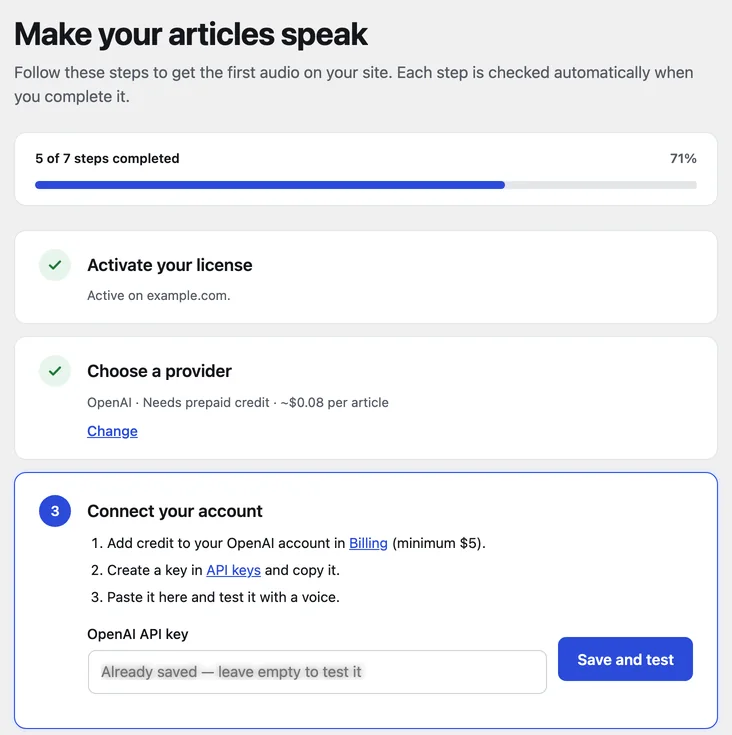
    Upload xtAudio to your WordPress site and paste your license key. The "Getting started" screen guides you through every step.

    xtAudio Getting started screen, with the license active on this site and the list of steps.
  2. Step 2

    Connect your AI account.

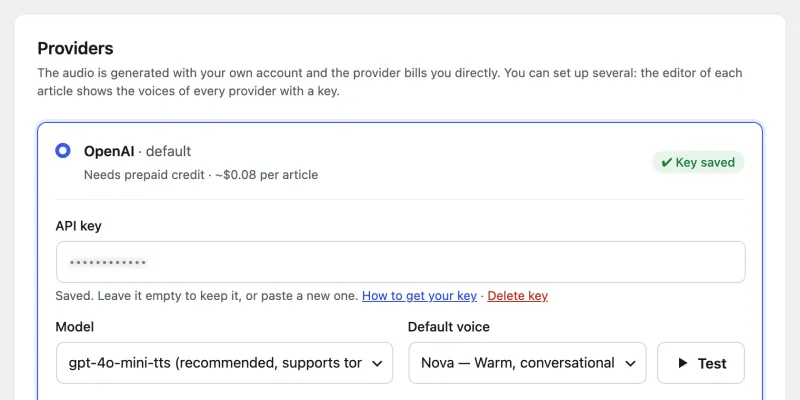
    Create your free Google Gemini key, or use OpenAI. Choose the language and voice, and test it before you save.

    xtAudio Settings → Provider and voice: the provider, the model, the default voice and the Test button.
  3. Step 3

    Convert and publish.

    Convert your earlier articles in a single task. New ones are narrated automatically when you publish them.

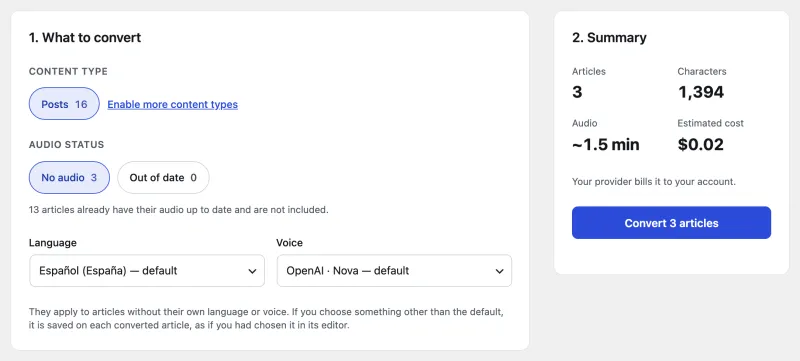
    xtAudio Convert articles screen, with the summary of articles, minutes of audio and the estimated cost.

Features

Everything your blog needs to sound great

  • Starting a home garden3:12EN · US
  • Cómo empezar un huerto en casa3:20ES · MX
  • Monday reflection4:05EN · UK
  • Reflexión del lunes4:10ES · ES
  • 5 ideas for your next trip2:48EN · US
  • 5 ideas para tu próximo viaje2:55ES · MX
  • 43 natural voices.

    30 Google Gemini voices and 13 OpenAI voices. Listen to each one with "Test voice" before you choose.

    30 Google Gemini voices13 from OpenAI

  • 6 languages.

    English, Spanish, French, Portuguese, Italian and German. With OpenAI you also choose the accent: US, UK, Mexico, Latin America, Spain, Brazil and more.

    • English
    • Español
    • Français
    • Português
    • Italiano
    • Deutsch

    Accents with OpenAI

    • Mexico
    • Latin America
    • Spain
    • US
    • UK
    • Brazil
  • Narrated when you publish.

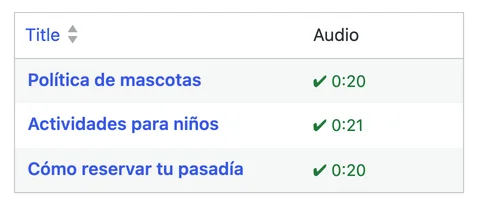
    Every new or edited article gets its audio in the background. It's only regenerated when the text, voice, language or model changes: you don't pay again for audio that's already up to date.

    Audio column in the WordPress post list: each article with its audio up to date and its length.
  • Your whole archive, in one task.

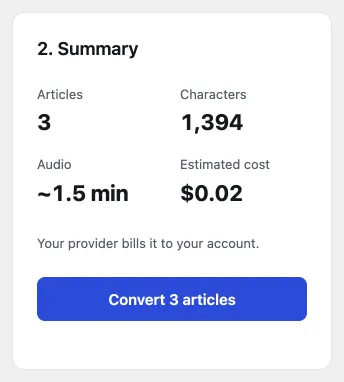
    Convert your earlier articles and see the estimated cost before you start. Pause and resume whenever you like.

    xtAudio Convert articles summary with the estimated cost.
  • A player in your brand.

    In your colors, above or below the article, with the spacing you choose. Speed of 0.5x, 1x, 1.5x or 2x, ±10 seconds and a share button.

    Listen to this article: this is how xtAudio sounds
    00:00
    00:00

    0.5x · 1x · 1.5x · 2x±10 s

  • Place it anywhere.

    With the [xt_audio] shortcode in the editor, in Elementor or another page builder.

    • Shortcode [xt_audio]
    • Elementor
  • Your account, your content.

    You use your own Google Gemini key (with a free tier) or OpenAI key. The text goes straight from your site to your provider: it never goes through our servers.

  • Test without using up sites.

    Localhost, staging and other test sites don't count as a site on your license.

    • localhostdoesn't use a site
    • staging.example.comdoesn't use a site
    • mysite.localdoesn't use a site

Before and after

Your blog, without and with xtAudio

Without xtAudio

  • Your articles can only be read.
  • People driving, working out or cooking miss them.
  • Recording them yourself takes a mic, time and editing.
  • Your earlier articles stay silent.
  • When you fix the text, the recording is out of date.

With xtAudio

  • Every article has its own audio and a player in your brand.
  • They're heard anywhere, at each listener's speed.
  • AI provides the voice: you just publish.
  • You convert your whole archive in one task, with the estimated cost upfront.
  • When you edit the text, the audio updates itself.

Founder pricing

Choose your founder license

Launch pricing for the first 100 licenses or until November 7, whichever comes first.

  • For your site

    Founder · 1 site

    $149 one-time payment

    You need your own Google Gemini account (it has a free tier with limits) or OpenAI account; you pay them for AI usage.

    • Full xtAudio for 1 WordPress site
    • Lifetime updates (for as long as we develop and distribute xtAudio)
    • 1 year of email support
    • Free 20-minute kickoff call (founders only)
    • Change sites up to 3 times a year from your account
    Buy now · Founder · 1 site

    After the offer closes: $199

The founder offer closes with the 100th license or on November 7 at 11:59 p.m. (US Central Time), whichever comes first, and it won't come back. Test sites (localhost, staging and similar) don't count as a site. Prices in US dollars (USD); where the law requires it, taxes are added at checkout.

Secure payment with Stripe · card, Apple Pay or Google Pay · prices in USD

Seller: Xtrategika (Rafael Omar Mojica García) · Irving, Texas, United States

Guarantee

30-day it-works guarantee

30-day it-works guarantee. If xtAudio doesn't work on your site and we can't fix it within 7 business days, we'll refund 100% of your money. And if you haven't activated the license on any site yet, not even a test site, we'll refund it without asking for a reason. Write to us within 30 days of purchase. It doesn't cover a change of mind after activating the license or your AI provider's charges. See the refund policy.

Before you buy, listen to the demo and check the requirements.

Requirements

What you need

  • WordPress 6.0 or later and PHP 8.1 or later. You can see them in WordPress under Tools → Site Health → Info.
  • Your own Google account (for Gemini, which has a free tier) or OpenAI account, with its API key.
  • Hosting that allows outgoing connections to your AI provider and to xtrategika.com (almost all do). WP-Cron working. Optional: ffmpeg, to save Gemini audio as MP3 (without it, audio is saved as WAV).

Check WordPress and PHP before you buy: if your site doesn't meet them, the refund doesn't apply.

Questions

Frequently asked questions

Do I have to pay every month? What happens if I stop paying?

There's nothing to stop paying: the license is a one-time payment, with no subscription or recurring charges from us. Your license stays active, updates keep coming (for as long as we develop and distribute xtAudio) and email support lasts 1 year from purchase. The only separate cost is AI usage: you need your own Google Gemini account (it has a free tier with limits) or OpenAI account; you pay them for AI usage.

What does "my own key" mean? How much does the AI cost?

xtAudio uses your own API key (BYOK, "bring your own key"): the audio is generated with your Google Gemini or OpenAI account, and they bill you directly. We don't resell AI or put our keys on your site. As a reference, a 5,000-character article (about 5 minutes of audio) costs roughly:

  • Google Gemini, free tier: $0, up to the daily limit Google sets. Google may change that limit; if you reach it, you continue the next day.
  • Google Gemini, paid tier: about $0.09 in 2026.
  • OpenAI (gpt-4o-mini-tts): about $0.08, with prepaid credit (minimum $5).

Before converting, xtAudio shows you the estimated cost. These are approximate figures: what you're actually charged is up to your provider.

Does it work with my theme or page builder?

It works with any theme. The player is added automatically above or below the content. If your page builder renders the page on its own (for example, with Elementor or Beaver Builder templates), you place the player anywhere with the [xt_audio] shortcode. It works with posts, pages and any public content type.

Do test sites count?

They don't use any of your sites: localhost, .local or .test domains, domains starting with staging. or dev., and staging domains of hosts such as WP Engine, Kinsta, Flywheel, Pantheon, Cloudways or WordPress.com. The full list is in the Sale terms. Use them only for development and testing. Note: activating the license on a test site does count as an activation for refunds.

What happens when the founder offer closes?

The offer closes with the 100th license or on November 7, whichever comes first, and it won't come back. From then on, prices are $199 (1 site) and $299 (5 sites). They include the same as today, except the 20-minute kickoff call. If you buy as a founder, you keep everything you bought: your sites, updates and your year of support.

Can I move my license to another site?

Yes. Free the site in My Account → Licenses ("Free site") or with "Deactivate on this site" in xtAudio → Settings → License, and activate the license on the new one. You can make up to 3 changes in any 365-day period (5 with the 5-site license). Freeing a test site doesn't count as a change. If you need more, write to us.

What if it doesn't work for me?

Write to us within 30 days of purchase with your order number, your site's address and what's happening. If we can't get it working within 7 business days, we'll refund 100%. If you haven't activated the license on any site yet, not even a test site, we also refund 100%, without asking for a reason. Once it's activated, refunds don't cover a change of mind or your AI provider's charges: before you buy, you can listen to the demo audio and check the requirements. The details are in the Refund Policy.

Which languages does it narrate?

English, Spanish, French, Portuguese, Italian and German. xtAudio narrates each article in the language it's written in: it doesn't translate. With Google Gemini, the voice detects the language from the text. With OpenAI (the gpt-4o-mini-tts model) you also choose the accent: US, UK, Mexico, Latin America, Spain, France, Canada, Brazil or Portugal. You pick a default language and can change it for each article.

What does "lifetime updates" mean?

You get every new version of xtAudio on the sites where your license is active, for as long as we develop and distribute xtAudio. "Lifetime" refers to the life of the product. If we ever discontinue it, we'll tell you at least 60 days in advance and publish a final version that works without license verification. After your support year ends, updates keep coming.

Do my articles go through your servers?

No. The text goes straight from your site to your AI provider, with your own key. Our license server only receives your license key, your site's address and the xtAudio and WordPress versions. Keep in mind that on Gemini's free tier, Google may use the content you send to improve its products; on the paid tier, it doesn't. Privacy Policy.

Do you sell in the European Union or the United Kingdom?

Not for now. We don't sell in the European Union, the European Economic Area (Iceland, Liechtenstein and Norway), the United Kingdom, Monaco or the Isle of Man, and checkout doesn't accept billing addresses in those countries.

Make your content reach people who listen, too.

Get my founder license

100 of 100 founder licenses left · the offer closes on November 7